Voices & dialogue
Voices bring the script off the page. Cast a voice for each character, perform every line with the right emotion, and add music and sound — captions are generated for you from the actual delivery.
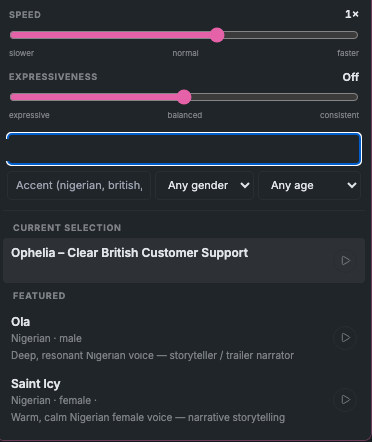
Cast a voice
Open the voice picker and narrow the library by accent (nigerian, british, american…), language, gender, and age range. There are dedicated child voices, a featured list, and your current selection at a glance. You can set a delivery speed and turn expressive delivery on or off.
Perform the lines
ShowMaker tags each line's emotion, then performs it — so dialogue lands with feeling instead of reading flat. Do this from the Script page (tag emotions and voice every line) or per scene from the storyboard.
The Listening Room
The Listening Room is the voice gate: audition each line, critique the delivery, and ask for an improved take until it's right. It's the audio equivalent of the Writers' Room — a place to get performances right before the final cut.
Music & sound
The Sound tab holds music and sound-effect libraries. Search for what you need (thunder rolling over distant hills, upbeat cinematic orchestral), preview it, or upload your own. ShowMaker can also score a whole show automatically — see The Editor.