The Writers' Room
The Writers' Room is where a story becomes a script you're happy with — before you spend a single credit on images or video. Shaping the script here is free; nothing downstream is generated until you approve.
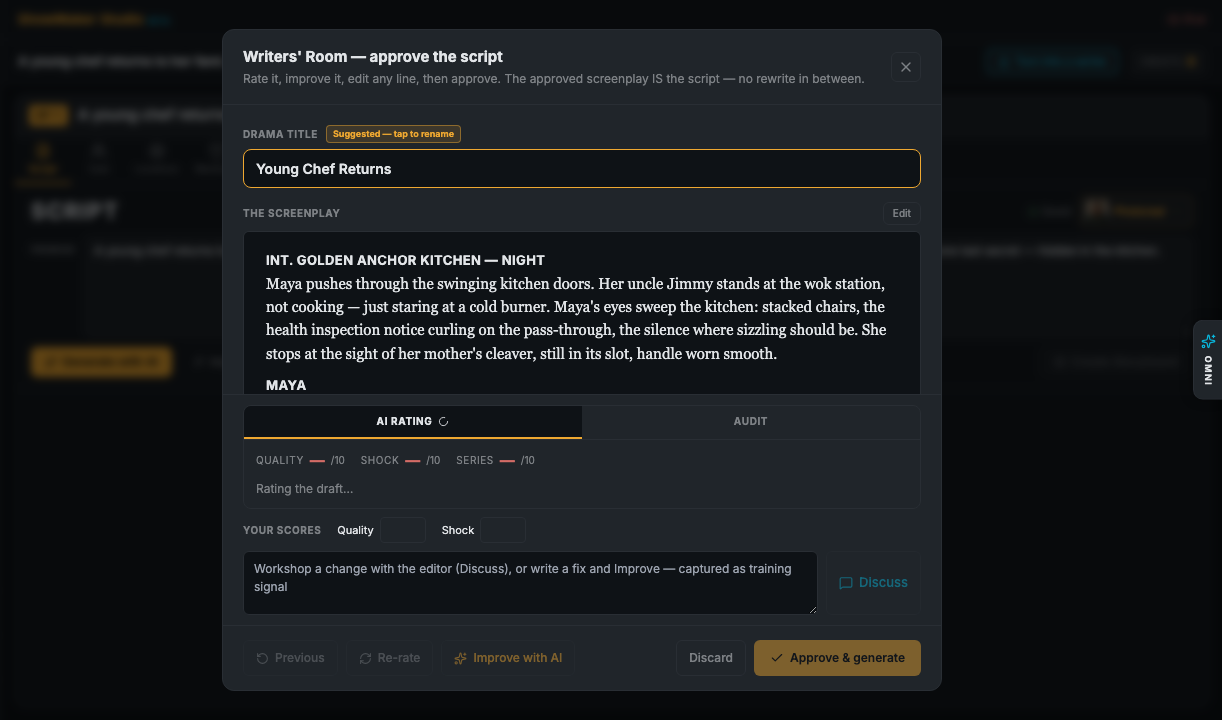
Read the draft
Your script is laid out as a screenplay — acts, scenes, action, and dialogue. You can edit any line directly; changes save as you go.
The AI read: rating & audit
Alongside the script, ShowMaker gives you an honest read of the draft so you know where it stands. Switch between two tabs:
- AI rating — scores for Quality, Shock, and Series potential, with commentary and notes. (AI can make mistakes — treat it as a second opinion.)
- Audit — a list of consistency findings across the story. Tick any you want fixed, and the next Improve pass addresses them.
There's also Your scores — your own Quality and Shock sliders — and a Discuss thread where you can talk through the story with the editor before changing anything. The read refreshes shortly after you edit, so you see the effect of a change without asking for it.
Improve with AI
Not happy with a draft? Improve with AI rewrites it in place. Run a full pass, or tick specific audit fixes first and it addresses just those. Use Re-rateto refresh the read, and Previous to step back to an earlier version.
Approve & generate
When the script is where you want it, hit Approve & generate. The approved screenplay is the script — there's no rewrite in between — and it unlocks the rest of the pipeline: cast, storyboard, voices, and the edit. You can always come back and revise.
After you approve: the automated build
Approving kicks off an automated build — but with one human checkpoint. ShowMaker finds the cast, locations and props your scenes need, pauses at an Asset Review gate so you can confirm and lock faces before anything renders, then builds the world and the storyboard for you. See the full sequence in Creation flows.