Creation flows
How you make a show depends on what you're making. When you pick a project type on the dashboard, ShowMaker runs the right flow for it — some draft a script for you to approve first, some take a screenplay you already have, and one builds a whole series outline. Here's what happens in each.
The five ways to start
| Type | You bring | Writers' Room? | What you get |
|---|---|---|---|
| 60-second Hook | An idea | Yes | A human-approved 60-second cold open, fully storyboarded |
| Short Film | An idea | Yes | A full script + cast + storyboard |
| Narrated Video | An idea | Yes | A narrated script over stills (streamlined tabs) |
| Pitch Film | A script | No | Your script structured, then a screening-style rough |
| MicroDrama Series | An idea | No | A multi-episode outline → a Series + one project per episode |
Three of the five — Hook, Short Film, and Narrated Video — share the same spine: you describe an idea, the Writers' Room drafts a script and you approve it, then ShowMaker automatically builds the world and the storyboard. Pitch Film and MicroDrama Series take their own paths.
What happens after you approve
For the three script-drafting types, approving in the Writers' Room kicks off an automated build. You don't drive it step by step — but there's one human checkpoint in the middle:
- The script is savedThe approved screenplay becomes your script — there's no rewrite in between.
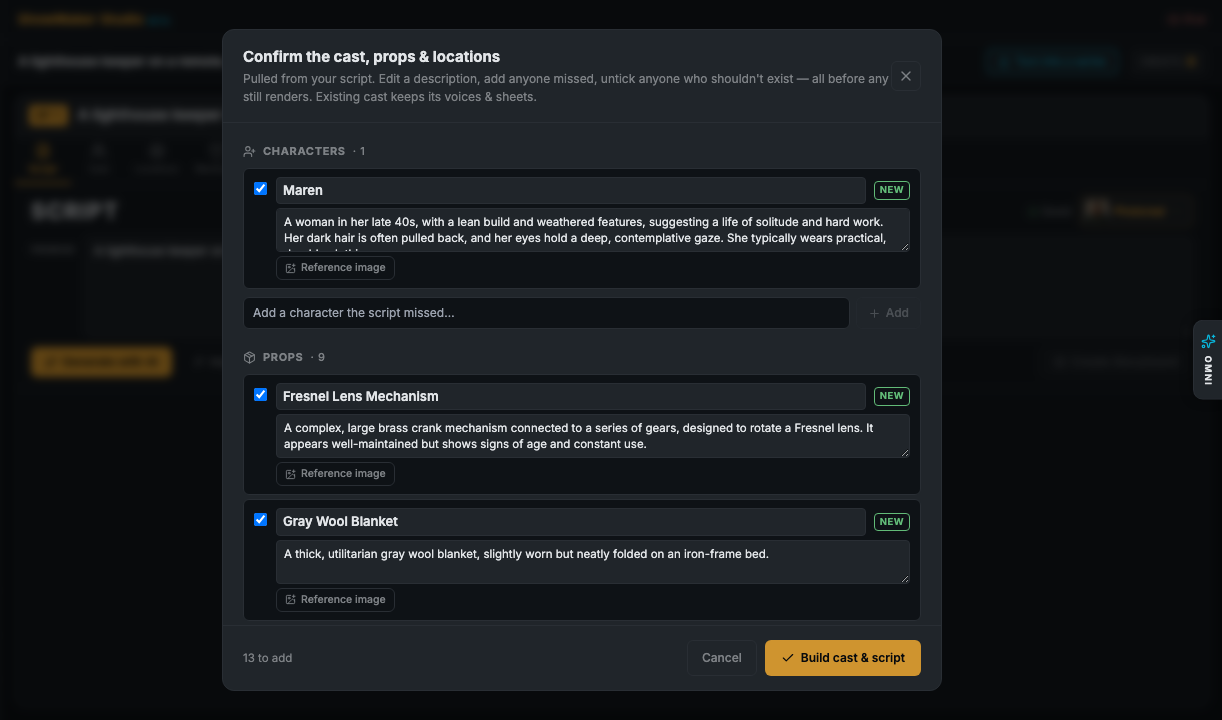
- The cast is foundShowMaker reads your scenes and pulls out the characters, locations, wardrobe, and props they need — proposed, not yet created.
- You confirm the cast & assetsAn Asset Review gate shows everything it found before anything is generated. Rename, edit, remove anyone who shouldn't exist, or upload a reference image to lock a face. This is the one place you steer the build.
- The world is builtIt creates the confirmed cast/locations/props, links each one into your scene prompts with an @reference, and generates their stills.
- The storyboard is renderedEvery scene gets a still frame, and you land on the Storyboard ready to direct the shots.
60-second Hook
The fastest way to see the whole pipeline. Describe a micro-drama idea, approve the 60-second cold open in the Writers' Room, and it comes out fully storyboarded — stills already rendered — so all that's left is to render video. A hook that lands can be turned into a full series later.
Short Film
The full version of the Writers'-Room spine: a complete script (no length cap, 16:9), a full cast and locations, and a storyboard. The walkthrough below shows the whole flow — idea → Writers' Room → Asset Review → build → storyboard.
Narrated Video
A streamlined flow for a narrated piece over stills — the tabs are trimmed to Script · Storyboard · Editor · Post (you can add cast anytime with Add cast). It still uses the Writers' Room and the same automated build.
Pitch Film
Pitch Film is script-in: you don't write a premise, you bring a screenplay. Creating one opens the Import Script door, structures your script faithfully, and runs the Asset Review gate — then deliberately stops before stills so you build the rough on your own terms, one step at a time. A Screening preview shows it as a 16:9 letterboxed rough. There's no Writers' Room — the contract is fidelity to your script.
MicroDrama Series
This one doesn't create a single project — it opens the Drama Builder. Give it a premise, pick an episode count, and it returns a structured multi-arc outline with a hit-potential rating. Lock in creates a Series project plus one project per episode, each of which you then build with the Writers'-Room flow above.