The Script
The Script page is your screenplay's home. Write from an idea, import a finished draft, and get it clean and consistent before you turn it into shots.
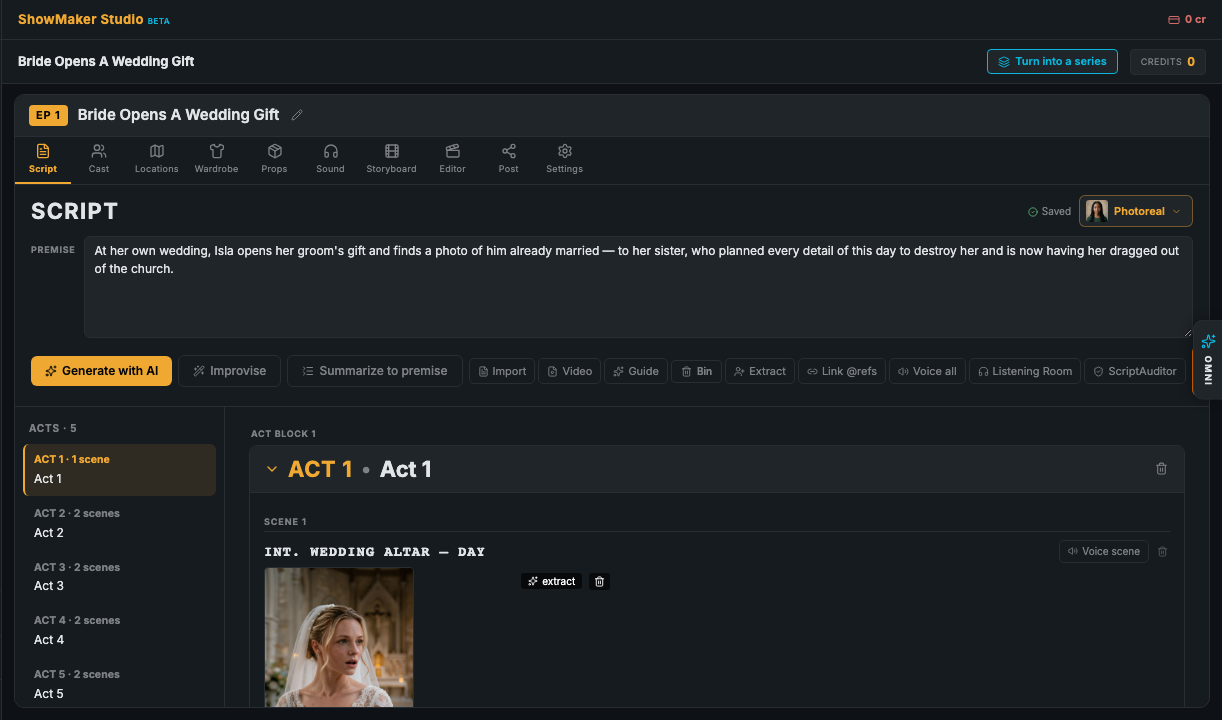
Start or bring your own
- Generate with AI — describe your story and get a full first draft.
- Summarize — paste a long story and condense it into a tight premise (with an undo to restore your original text).
- Import Script / Import Video — bring in an existing screenplay or footage.
Prepare the script for production
The toolbar has a few one-click helpers that get a draft ready to storyboard:
- Extract Cast & Locations — reads the script and creates the characters and locations it mentions.
- Tag prompts with @references — links scene descriptions to your cast, locations, and props so stills stay on-model.
- Tag emotions + voice every line — a cheap, no-render pass that marks each line's emotion and prepares it for voicing.
- Script Auditor — checks the whole script for consistency across every layer before you commit to stills.
- Screening preview — for pitch films, preview the script as a 16:9 screening with letterbox and title/act cards.
Build the storyboard
When the script is ready, Create my storyboard now turns your scenes into a shot-by-shot board. That's covered in Storyboard & Shot Sheet.
The Script Assistant
The Script Assistant lives in the assistant panel next to your screenplay. Ask it to rewrite a scene, add a character or location, adjust dialogue, or tag prompts — it can make the change for you and reports back what it did. Give it a bit of context (character notes, tone, a previous summary) and it stays on the same page as you.
Prefer to talk? The same assistant is available by voice through the Omni Assistant.